Digital Arts Is A NewTek Elite Partner and
Eight Time Top 10 North American Reseller
1-800-692-6442


Showing posts with label Hands On Review. Show all posts

Friday, May 23, 2014

TriCaster 410 Hands ON

A previous post pointed out the main differences between the new TC410 and the TC460 but let's take a more in depth look at the entry level 'Pro' TriCaster. A new update was released today which adds a few new features including ISOCorder.


The 410 is a four input 15 channel switcher with two DSKs. Video I/O is via SDI only there are no analog inputs. It will work with standard def cameras as long as they have SDI. The TC410 has two independent SDI outputs and an HDMI output.

Audio input is via one pair of balanced XLR mic/line inputs, one pair balanced 1/4" phone inputs and of course embedded audio on the four SDI inputs. Audio is output via 1 pair balanced XLRs and a pair of balanced 1/4" jacks for the aux plus a standard 1/4" headphone jack. Audio is also embedded in the SDI outputs.

The back panel also contains the outputs for the user interface (DVI) and multiview (HDMI) along with four USB ports, Ethernet, eSATA and OS/2 ports. The 15 pin tally port common to all Pro TriCasters is also found here.

The TriCaster 410 shares the user interface most of the features of the other more expensive Pro TriCasters including the new gen LiveSets and the new M/E configuration that replaced the Virtual Inputs. The M/Es allow you to output an M/E directly to the Aux output so you can actually perform two independent switches simultaneously. Record a full production while feeding fully produced (transitions, overlays and special effects) content to a large screen display etc.

In contrast to the TriCaster 40 you also get 15 still buffers, two DDRs for video playback the full macro and snapshot system.

The TriCaster 410 In Action

OK so how does it all work? Pretty well I'd say. If you currently are a TriCaster user the first thing you notice is everything looks different and the workflow is new. This takes a little getting used to but once you do you'll never want to go back.

The most striking difference is that the Virtual Input tabs are gone and replaced with a new M/E section above the main switcher controls. This section of the UI can be hidden if you aren't using it to help de-clutter the screen.
The M/E can work in two modes. The mix mode acts just like another video  switcher with two sources and a T-bar along with a keyer. This whole mix can be output via the aux out or even recorded to the hard drive. The Effects mode let's you set up green screen overlays, picture in picture effects and LiveSet effects. Another cool feature is that you can assign a M/E preview to one of the thumbnail preview slots in the upper left of the UI. This let's you actually see the talent in the virtual set on the preview.

The M/Es also have presets so you can expand the functionality by instantly switching from one configuration to another. In fact almost everything in the interface has user definable presets so you can manage even the most complicated show.

The main switcher and the two DSKs function pretty much like they always have with the exception that the utility/FX row has been consigned to the dustbin of history. That functionality is now all contained in the M/E.

Full Complement of Media Players

The lower part of the UI contains the displays of the various media players. The TC410 has two DDRs, two graphics players and a sound player. There is also a tab with the 15 still buffers. For those of you not familiar with the TriCaster the DDRs are simply modules that can play video clips or lists of clips. These come into the switcher on the inputs labeled DDR1 and DDR2 and can be set to play automatically when the source is selected on the program bus or an active (visible) M/E. The graphics and sound players work in a similar fashion.

Still Buffers

The still buffers are an expanded version of the buffers on the 455/855 machines. You assign a particular image to a buffer and then you can use that as a source in a DSK without using one of the graphics players. In fact buffer 1 can be used as a source directly in the main switcher and/or in an M/E. The buffer image files can actually be updated over a network connection while they're live for instant updates.

Social Media

The current Big Idea in broadcasting is the "Second Screen". The concept is to have content related to your production updated in real time on the web as it happens. Youtube, Twitter, Facebook and other sites can be used to provide interactions with your viewers and for promotional  efforts. Now with the TC410 and the other Pro TriCasters you can instantly initiate uploads of  video clips and still images to the various social media sites or your own FTP site. So you can, for example,  load a clip into a DDR, trim it using the tools in the DDR and with one click upload it directly to Youtube.

Complexity Reduction

The new TriCaster does so many things that it's pretty easy for the operator to get overwhelmed. Running two independent switcher, uploading to Facebook, managing a bunch of overlays and all the other functions that need to be done might be too much for the non-Super TDs out there so NewTek has taken steps to help us out.

Multiple operators can be involved. The TD (Technical Director) can be running the switch(es) using the CS controller while CG (character generation) is handled by an operator on a networked PC running LiveText (available separately). The social media end can then be done using the mouse and keyboard on the TriCaster. But dividing up the major jobs still may not be enough so the TC410 has a pretty extensive macro capability built in.

Macros are simply a sequence of actions that can be executed with a button push. Any series of switcher actions could be recorded as a macro and then assigned to any button on the CS controller or computer keyboard and then executed whenever the TD needs. An macro editor is also included to you can clean up, modify or even create from scratch any macro. You can also create 'snapshots' of the switcher at any time so a setup can be easily recalled.

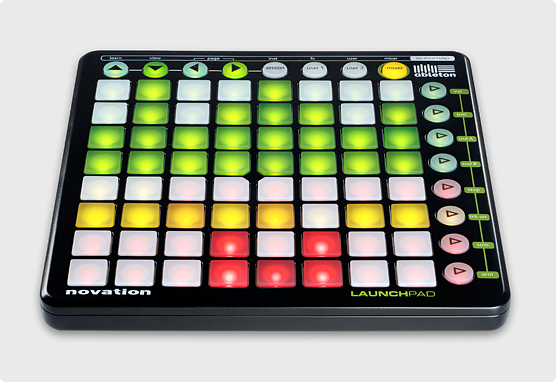
This is an extremely powerful feature that can be combined with new MIDI support to use any number of external controllers like the Novation Launchpad to fire macros.launchpad-ableton-main-image.png
Macros can also be assigned to 'Hot Spots' on screen so that on-air talent can actually trigger macros just by touching a spot in the air. This was a feature originally seen on the TriCaster 8000. So now the TD doesn't have the excuse of only having two hands!

Audio

The TC410 has two mic/line XLRs and two 1/4" audio inputs. The mixer panel has channels for the inputs switchable between those analog connectors or embedded SDI audio. It also has controls for the media players and network inputs. You also get sliders for the main output, streaming output, recording level and the aux output. And all these ins and outs have multi-band EQ and compressors/limiters.


So where exactly does the TC410 fit into NewTek's product line?

Compared to the TC40 you gain:
  • SDI inputs (but no analog) - Use pro cameras.
  • IsoCorder - Record four streams of video. New Feature!
  • 4 balanced audio mic/line audio inputs vs 1 unbalanced stereo and one mic input
  • 2 pair balanced audio outs vs. 1 unbalanced
  • Flexible and route-able M/Es vs VIs - Do a second switch to a second output and more.
  • Macros/Snapshots - One button simplicity.
  • Hotspots - Let the talent trigger macros.
  • MIDI - Trigger macros from 3rd party controllers.
  • Routable Audio - Makes it easier to do quad, SAP or a mix-minus.
  • Adjustable audio delay - Compensate for upstream and downstream equipment latency.
  • Multi-band EQ and Audio Compressors
  • 2nd DDR - Manage your B-roll and commercials.
  • Rugged Rackmount Chassis - Stands up to the rigors of the road.
  • Bigger/Better Controller - Controls for almost every feature of the TriCaster.
  • Social Media Support - Professional quality second screen content.
  • Improved UI/Workflow - Get a handle on even the most complicated production
  • Integrated PTZ Camera Control - Use the joystick on the CS to control your cameras.
  • Improved Network Video Support - Use webcams as an input and send mpeg2 streams to other TriCasters and third party apps.

You lose these features from the TC460:
  • Analog Video I/O - In addition to SDI video inputs and outputs the 460 has component, composite and S-Video ports.
  • Removable Storage - The 460 has a removable drive bay which makes it easy to swap dives.
  • Audio inputs - The 410 has two stereo audio inputs while the 460 has four.
  • Genlock Input - The 410 lacks a genlock input. Most users won't care too much about this.
  • Anim Buffers - Both machines have still buffers (the 460 has 10 while the 410 has 15) but the 460 also has five animation buffers so you can play looping animations without using a DDR.
The Bottom Line:
All in all if you don't need analog video inputs you should take a close look at the 410. If your budget can support the 460 it is a more flexible machine and is worth the difference in price.

Tuesday, March 15, 2011

TriCaster TCXD850 Hands On Review (part 1)

The TriCaster TCXD850 is NewTek's biggest and baddest product ever. The latest addition to the TriCaster line is also the heir to their premier production product - the recently discontinued VT[5]. The '850 shipped in December and the rev 2 software that was released at the end of January brings the switcher up to 24 inputs.That's eight cameras inputs, eight 'Virtual Inputs' (sort of M/E buses), two network inputs (LiveText or iVGA) plus assorted media player modules and frame buffers. The TCXD850's switcher also sports two down stream key channels.


The '850 is housed in a heavy duty 4U rack mount case with a large ventilation grill on the left side of a hinged front cover. Under the cover you'll find a couple of USB ports and four caddy-less removable drive bays. The top bay is populated with a two terrebyte hard drive while the three lower bays are empty but can be filled with standard 7200 RPM SATA hard drives to expand the on-board stoarage.

The front cooling fan is quite noisy but NewTek has a quieter fan available that can be installed by your dealer. I'd recommend this upgrade unless the '850 is going to reside in a machine room. The power supply is a redundant, hot swappable unit. If one of the PS units fails it can be removed and replace while the '850 remains powered up by the other supply.

At 42 pounds the TriCaster isn't exactly light but it's manageable. If your shopping for a portable rack be aware that the unit is about nineteen inches deep so you might need a custom built case. There are no cooling vents on the top or sides to worry about.

Encrusted with I/O

The eight camera inputs will accept standard def composite, S-Video, component or SDI signals or high def  component or SDI. You can mix and match any of the input types.

The TCXD850 has two main outputs with the same assortment of connections. The output format (HD/SD) is set when you initially configure your session  A third 'aux' output can be configured as either a third copy of the main out, optionally at a different resolution or as a dedicated output from the program, preview, utility buses or directly from any one of the switcher sources. The '850 also has a dedicated HDMI output so it's easy to connect a HD monitor or projector.


NewTek went all in with the audio. The back of the unit has sixteen xlr connectors that can be used with either line level sources or microphones. If using condenser mics you can even switch on phantom power. There are also eight AES/EBU digital audio inputs and you can also use embedded SDI audio. These inputs are grouped into stereo pairs for the XLRs while the digital inputs support four channels each.

You get two outputs again both XLR and digital plus an aux output that can be configured as a dedicated output from the DDRs etc. The audio is rounded out by an actual 1/4 inch headphone jack.

The '850 has two DVI monitor ports. One for the main user interface and the second for a 'multiview' monitor. The multiview can be configured as a deducted program/preview output or in a number of different setups with source previews, waveform monitors and output windows. One of the biggest new feature is the ability to monitor all switcher sources on screen. The multiview lets you spread those previews across two monitors.

There are four USB ports on the back and two more on the front. These are used for mouse, keyboard and other external controllers such as the TimeWarp, LC-11 or 850CS.

Main Switcher
The main switcher has a program and preview row that both have twenty-four input sources. The program row selects the source that will appear on the output while the preview row lets you select the source you are going to to go to next. You then can use either the T-bar or the Auto/Take buttons to switch the inputs.

Rev 2 of the software introduces a new video layer paradigm to the switcher.  These layers are from back to front:
  • Background - Your main source selected via the program bus of the switcher along with any transitions as you switch between sources.
  • DSK1 - The first down stream keyer, you can key any of the sources available with the exception of virtual inputs. This can be positioned, resized and rotated.
  • DSK2 - The second DSK with the same features as DSK 1.
  • FTB - Fade to black. This lets you to fade to black without making any changes to the other three layers.
The main T-bar's function is assigned by the four buttons just above it. You can use the T-bar to control any of the video layers. If you select more then one function you can actually do things like cross fade the DSKs and do a transition on the BKGD layer with one pull of the T-bar.


To the right of the T-Bar are controls for the video layers (Fade to black has no additional controls). Here you can select between fades and various transition  for a layer and in the case of the DSKs - position, size and rotate the layer. The Fade and Take buttons let you fade or take an individual layer regardless of how the T-Bar delegate is set.

The third row on the switcher is the utility row. This row is used to select the sources that appears on the two DSKs, the Aux output and the FX bus. There are delegate buttons that change the utility row's mode making it easy to manage these sources even during a live switch. Here too you can multi-select and assign the utility row to multiple functions.

Part 2 in a day or two

    Wednesday, June 2, 2010

    TriCasterTCXD300 Hands On Review

    The TriCaster TCXD300 works in a similar fashion to the previous five incarnations of the TriCaster but NewTek has taken all the user input and tweaked the user interface quite a bit. There is an entirely new paradigm for the virtual set that is a vast improvement to the way they were sort of tacked onto the standard def units.

    The TriCaster TCXD300 has a thirteen input switcher with three video inputs, a DDR to play media clips, a network input to use with iVGA or LiveText, a CG input, a still store, a black channel and five 'virtual' inputs. More about these later. The video inputs will accept composite, S-Video or component analog and SDI digital video. You can mix and match SD and HD sources. The TriCaster has matching outputs and can simultaneously output SD and HD.

    The switcher includes hundreds of transitions. The assortment is varied but more tasteful then previous NewTek products. A touch of whimsy is still evident though as a sheep transition is included.

    The top of the user interface screen is dominated by the video preview windows. The default config is a large program output window on the right with eight smaller previews for the three cameras, network input, still store, CG, DDR and a preview bus.

    There are three tabs so that you can re-configure the previews so you get large Program, Preview and Waveform Monitor/Vectorscope windows or large Program Preview and Effects bus windows. This preview section on the main interface can also be re-sized or removed allowing more room for the tabbed panels in the lower part of the screen.

    You are free to remove the previews because the DVI output on the back of the TCXD300 can be configured as a preview output. You have a choice of a number of different layouts including all sources, full screen preview, preview and WFM/Vectorscope etc.

    One of the biggest improvements to the interface is the addition of little 'gear' icons sprinkled about. When these are clicked configuration panels pop up so it's easy to quickly access a particular feature's settings without the interface being cluttered with rarely used controls.

    The other big interface change is the way the LiveSets (NewTek's virtual set system) is configured and used. Previously the LiveSets were sort of integrated into the chroma keyer but in the TCXD300 the switcher has now sprouted five new virtual inputs. These virtual inputs are configured using tabbed panels just below the switcher. On this panel you'll find what amounts to a mix/effects bus.

    Here you can select two sources that will be used by the virtual input with individual positioning and scaling controls so you could, for example, create a picture in picture effect by resizing and positioning one of sources. Or you can load one of the included virtual sets and insert your talent into a virtual environment. Some of these environments include on-set 'TVs' which are fed from the second input source.

    NewTek has made improvements to Live Sets so they can now be zoomed in real time so you can do a nice smooth zoom between the presets. The presets can also be easily modified just by dragging little sliders this all makes the LiveSets much more flexible. Over a dozen sets are included plus several split screen effects and a PiP preset. The new sets are really slick looking and include multiple camera angles, double boxes, over the shoulders, stand-ups and closeups.

    In addition to the two input sources each virtual input has an overlay channel. In a big change from previous NewTek products you can use any of the switcher sources as an overlay and again, the overlay is both positionable and scalable. Another new feature is the ability to use any of the transitions to bring the overlay on and off.

    On top of the upstream overlays in the virtual inputs NewTek has also included in the TCXD300 two downstream keyers. Any of the switcher sources can be re-sized, positioned and brought on and off with any of the transitions. A cool feature lets you selectively lock the two independent overlays together so that they can be simultaneously activated or by locking them when one is active and the second isn't - toggle between them. Multiple downstream keyers has been a requested feature since forever and it's great to finally get it.

    One of the weaknesses of the standard def TriCasters was the audio section. The TCXD300 has two balanced (XLR/TSR combo jacks) inputs with switchable phantom power, and two four channel balanced line level inputs_1/4" TSR jacks) and three, four-channel AES/EBU digital inputs (BNC jacks) and it also accepts embedded SDI audio. You can't use all the various line and digital inputs simultaneously but you can mix and match them to a certain extent.

    The mic pres have enough gain to make my Shure SM-2 headset microphones work like champs, unlike the preamps on my TC Studio. Input and output levels are a good match for a Mackie mixer. Like the Mackies the levels sort of split the difference between the -10dBu consumer and +4dBV pro standards. As an audio engineer I'd prefer they were switchable between the two standards but this is a workable compromise.

    The TCXD300 sports both analog and AES/EBU audio outputs, both four channel. And a 1/4" headphone jack with enough oomph to actually drive real headphones is right there on the front. A great new audio feature is the assignable aux out. You can now choose between the DDR,the Still store (which can double as and audio player - go figure), both or the main mix to be output on dedicated connectors. You'd mainly do this to feed audio generated by the TriCaster to a house mixer which on previous TriCasters required soloing the DDR and feeding the headphone output to the external mixer.

    The audio mixer interface has nice big meters and level 'sliders' for each of the inputs plus independent output level controls for the stream and aux outputs and a volume control for the headphones.

    This review could probably go on for a couple more pages but I need to cut it short so I'll skip details on audio follows video, improvements to iVGA, one click preset loading in the DDR, audio, titles and still panels and SpeedEDIT2 and probably a dozen other things.

    The TriCaster TCXD300 is one heck of a machine, it's a lot more then just an "HD TriCaster". I've been running it  for several months and it's been rock solid. It seems to be well built and the user interface is well thought out. The only real limitation is the number of video inputs. But if you can make do with three cameras you'll be able to use the TCXD300 to produce video of the highest caliber. If not NewTek is going to be shipping the TCXD850 with eight video inputs in July.


    Updated with pictures

    Wednesday, August 19, 2009

    NewTek 3Play - Hands On Review

    The 3Play is a three channel instant replay/slo-mo/field recorder device from NewTek . This is NewTek's first foray into the HD jungle and probably a little higher-end then they have attempted in the past. The TriCasters and the VT are all aimed at, priced for and dominate the church/school/independant producer market. While the 3Play is aimed squarely at a market dominated by EVS and the Thomson K2 but still at a game changing price point.

    The basic features of the 3Play are straight forward - three input channels that will accept either SD or HD signals via composite, S-Video, component analog or serial digital (SDI). Each channel also includes four audio inputs with your choice of balanced analog, digital (AES/EBU) or embedded SDI. The outputs duplicate the input connections.


    All three video and twelve audio inputs are recorded simultaneously in a single multi-stream file to ensure that everything always stays synchronized. The 3Play's output can be configured as either three separate streams to feed a downstream switcher or with a single output to which any of the streams can be switched by the operator.

    The 3Play work flow is also straight forward. When you begin a new session you select which video format (1080i, 720p, 4:3 SD or 16:9 SD) you want to use and whether you will be using the three output or single output mode. The only restriction is that all three inputs and outputs have to be the same format as the 3Play can't transcode between them. You can then configure the input connectors you will be using. 

    In the triple output mode when you begin a session the 3Play is simply passing through the live audio and video from all three inputs. Simply presses the 'Record' button on the included  3P-10 controller and the unit begins recording all three streams to the internal RAID. My unit has enough storage for 11 hours of 720p multi-stream and 8 hours of 1080i multi-stream. So even if the game goes to extra innings you have plenty of space.

    In single output mode you also get to select which of the three streams is active on the output simply by clicking the corresponding small preview window or using the three selection buttons on the 3P-10 controller.

    Once recording, you as the 3Play operator, become a wizard of space and time. You can build a replay list in real time using the 'Mark In' and Mark Out' buttons and completely control play back. While you're playing back a segment the 3Play continues to record so you never have to worry about missing any action. This is great for sports that don't stop like auto racing or soccer.

    The slo-mo is interpolated so that no matter how slow you go the motion remains very smooth. The engineers at NewTek have obviously worked hard on the slo-mo algorithm. You can control speed with either preset buttons for 25, 33, 50, 75 and 100 percent playback speed or adjust the speed interactively using a t-bar.

    The 3Play can be operated entirely from the 3P-10 and the only time you need to use the mouse and keyboard once you have begun a session is to label replay list events. The controller has a jog/shuttle wheel for cueing up events, controls for managing the replay list and the play back transport.


    The replay list is the heart of the 3Play. There are actually six replay tabs. As you add events to the master list you can color code them. These color coded events are automatically added it to one of the five color coded tabs. This allows you to organize your events in order to build highlight reels or to make it quicker to pull up a particular type of event you might need.

    The replay list is completely non-destructive so you can add, remove, modify or reorder events at any time. The events in the replay list have a selection for camera. You use this to set the primary camera for playback in single output mode. This selection is also used when you export a list. If you want to replay an event from several cameras you can clone an event and change the camera for the second angle.

    During the export process the mult-stream file is split apart and individual files are saved as per your replay list. The exported files are in a standard mpeg2 format so they can be edited with almost any editor. The cool thing is how fast this export function works, it's apparently just a simple file copy process so it's both fast and lossless. There is no degradation of the video quality.

    The 3Play has other applications besides instant replay. It's a cost effective field recorder since you can record three cameras and twelve audio tracks it has uses for recording concerts and other live events. All three streams can be exported for post production editing. Sports motion analysis is another application since you can playback the same action recorded from three angle in perfect sync.

    The bottom line is that you can't touch the 3Play's features for any where near it's $21,995 list price. NewTek has really brought network quality instant replay to the masses. The video quality is top notch, the workflow is easy to use and the price is a bargain.

    NewTek 3Play available from Digital Arts call us for a price at 1-800-692-6442

    Friday, January 23, 2009

    TriCaster Duo Hands On Review

    We got our first TriCaster Duo and I've had a chance to spend a little time with it now. This is NewTek's newest offering in their line of all-in-one production units It's very similar to the base model TriCaster 100 but designed with the K-12 educational market in mind. It is also available to commercial buyers. The educational list price is $2995 and the commercial list is $3995. You can call us at Digital Arts 1-800-692-6442 for an actual price quote.

    The Duo is housed in a simple silver box with all of the A/V connections on the front. It's a little smaller and lighter than the original TriCaster. The back has the computer monitor, mouse and keyboard connectors along with four USB2 ports so it's easy to connect external drives or memory sticks.

    The TriCaster Duo is a three input video switcher with RCA jacks for composite video and the conventional 4-pin mini-din jacks for s-video input. For audio input it sports a pair of RCAs for line level audio and two 1/8" mini jacks (like those used on computer sound cards) for microphones. There are no input trims on the mic inputs so you shouldn't use them with line level sources.

    For outputs you get both an RCA composite and a mini-din s-video outs that are both usable simultaneously along with a pair of RCAs and a 1/8" headphone jack for audio. As with the other TriCasters the Duo can be set up to use the headphone output as a second audio bus by using the solo buttons to route selected sources directly to it.

    The interface is almost identical to the TriCaster 100 with one major exception. NewTek's video editor is not included. This allowed them to use a less powerful and therefore less expensive processor in order to get the retail price so low.

    The TriCaster Duo ships with around 250 different DVEs including a large number of wipes, fades curls and trajectories. So you have enough different transitions for just about any situation these load into a single bank of ten on the interface so you can have your favorites at you fingertips. You also get a large selection of title templates. Professionally designed, you can use these as a base for overlays and other graphic screens.

    If you prefer to create your graphics from scratch NewTek also includes a full blown CG just like the other TriCasters and the VT[5]. With the CG you can create title templates from scratch and import graphics done in another program like Photoshop.

    Graphics and text are keyed over your video from the Overlay control panel you can use Title Templates, the picture viewer or NewTek's external CG editor Live Text as a source.

    The Duo can either record your production to the hard drive as a high quality MPEG file or stream it live using the Windows Media Codec but not both at once. You'll need to step up to the TriCaster Pro to do both at once. My unit had about 200GB free on the hard drive which should be good for more than 16 hours of video.

    A few noteworthy negatives: The Duo ships with XP Home rather than Pro, this will only be an issue for corporate buyers who try to connect to a network that has domain controllers. XP Home can't connect to a domain.

    The unit has a place to mount a 120mm fan in the back but NewTek doesn't include one. I've always felt the more cooling the better but this would be pretty easy to have your dealer install and probably isn't necessary unless you are going to be operating in extreme conditions.

    There is no firewire port so if you want to capture video for use in the DDR you must use either the composite or s-video connectors. Again not really a big deal but it would be a nice feature to have.

    The bottom line is the TriCaster Duo is a good value for the money and has all the features you need for basic video production and webcasting. You should carefully evaluate your needs to be sure you get the right TriCaster for your particular situation but if your on a tight budget, don't need Virtual Sets or an editor the Duo might be just the thing.

    Update: I forgot to mention that the academic version also includes a curriculum handbook and a 40 minute video tutorial. I'll post some more info on the curriculum in a few days after I've had a chance to look it over more closely.


    See the TriCaster Duo at Digital Arts