Digital Arts Is A NewTek Elite Partner and
Eight Time Top 10 North American Reseller
1-800-692-6442


Tuesday, April 14, 2015

TriCaster Advanced Edition

 
The big news at NAB this year is NewTek's announcement of  TriCaster Advanced Edition. This is a new optional add-on package for any of the current  proline TriCasters (410, 460, 860, 8000) and the Mini that adds hundreds of new features and expanded capabilities.

The Advanced Edition can be purchased with a new TriCaster or added after the fact to existing TriCasters for $1495 and it's shipping now.

Some of my favorites among the new capabilities are:
  • Audio noise gate (I'm an old audio guy so what do you expect). 
  • Datalink integration so you can, among other things, have CG pages automatically update.
  • Macro triggering. Macros can be automatically triggered by certain events like playing the DDR or other switcher actions.
  • Transitions between clips in the DDR. You used to be able to do this in the old VT so it's nice to see  it finally make it to the TriCaster.
  • Blue gun mode and display calibration so you can finally get those computer monitors to display correct colors.
  • Button lock out. Disable unused switcher buttons so when you fat-finger the controller you don't accidentally get a blank input.
  • Built-in Instant replay functions.

This is at least as big an upgrade as the x55 to x60 update was. It's got some truly mind boggling features that are going to take me a while to digest. But it's cool that if you don't need all these advanced functions you don't have to pay for them. We sell plenty of TriCasters to people who just need a basic switcher and all these options just might make the interface a little too confusing and the price a little too high.

Owners of original TriCaster 855 and 455 are  being offered a special deal for an upgrade to 460/860 Advanced Edition for less than the price of the x60 upgrade alone. And for a limited time all new TC8000 are coming with a free upgrade to Advanced Edition.

Give us a call at 800-692-6442 to place an order or for more details on the specials.

Here's a quick run down of all the new features:

Audio
  • Dante Audio Networking: Expand integration and IP workflow possibilities with audio input over the network from devices that use the Dante networking protocol from Audinate.
  • Audio Output Configuration: Dedicate output of Master and Aux audio mixes from TriCaster’s built-in audio mixer directly to external audio gear. With this revised configuration, Master and Aux are supplied to the first two analog output groups, respectively.
  • Audio Recording Options: Capture your configurable sound source for ISO recordings with per-channel audio signal selection.
  • Default Media File Level: Reduce time spent on individually configuring audio levels for non-native clips and sound files, and instead assign a preset level to all files added to media players.
  • Noise Gate: Manage audio signals with greater precision using new noise gate settings in the audio mixer to exclude low-level sounds.
  • VU Meters: Achieve higher-quality sound by determining audio clipping more easily and accurately with an updated VU meter interface.

Data
  • DataLink Integration: Use real-time data from internal and external sources in your live program without adding dedicated data input software. Built-in DataLink maps your selected data source to titles, comments, file names, and other fields in graphics templates, and updates their corresponding content instantly—automatically or on-demand—ensuring you have the most current and accurate information.
  • DataLink File Watcher: Save time converting detailed information like sports statistics and sales data into graphics. With DataLink and a CSV, XML or ASCII file, you can transform raw spreadsheet data into production-ready title pages that can be edited and updated in real time.

Macros
  • Multi-Step Macros: When timing is everything but anything can happen, take control by creating automated sequences using macro commands with expert pacing and built-in pauses that wait for your (live) cue to resume.
  • Macro Triggering: Gain additional flexibility for activating automated macro sequences with new triggers that include audio level changes, media playback, and specific switcher actions, and the ability to assign multiple triggers for the same macro.

Media Players
  • Playlist Effects: Produce more engaging playlist sequences from your on-board media by adding transitions between playlist media—and even combining real-time, slow-mo, and fast-mo with per-clip playback speed settings.
  • Real-Time Clip Editing: Speed up turnaround of raw recordings and video files for DDR playback with easy, built-in clip splitting and trimming tools.

Monitoring
  • Display Outputs: Choose from more video signal selections to monitor, display, or project using the supplemental display ports—and customize every screen in your setup to your workflow.
  • Blue Only Option: Calibrate video signals with greater flexibility and accuracy with a Blue Only viewport overlay compatible with any monitor.
  • Monitor Proc Amps: Compensate for environmental lighting conditions and external display settings with configurable color settings for the User Interface, Multiview, and display ports.
  • Multiview Scopes: Eliminate the squint factor and calibrate video signals with greater precision using large waveform and vectorscope displays on Multiview.

Operation
  • SDI Auto-Detect: Save time during SDI system setup with automatic detection of resolution and frame rate for most SDI cameras.
  • IP Network Tally: Reduce on-air mistakes with visual indication of on-air status supplied over the network to compatible systems that are sending output to TriCaster network inputs.
  • Metadata: Attach comments to sources, clips, and images to simplify and sophisticate your workflow at the same time. DataLink uses comments as internal data sources to feed titles, label published content, enter metadata, and more.
  • UI Enhancements: Work more efficiently and keep a closer eye on the show with new visual indicators, updated shortcuts and control tools, hover tooltips, and other on-screen improvements.
  • Button Lock: Protect your live program from accidents or mistakes by locking control surface buttons to their current state.
  • Session Recordings: Locate and verify active and completed recordings more quickly with a dedicated Session Recordings browser folder.

Publishing
  • Publish Target Expansion: Maximize productivity and reach more friends, fans, and followers with the ability to publish media to multiple user accounts on the same social network simultaneously. Plus, publish content to the world’s largest professional network - LinkedIn.
  • Flex Media Publishing: Publish more files to more places in more formats using an upgraded publishing workflow that also supports file import, export, and transcoding right from the Publish queue.
  • Alpha Grabs: Grab stills of keyed visuals - complete with transparency - for publishing or post-production use.

Replay
  • In-Show Replay Controls: Turn everyday productions into drama relived, without adding extra hardware or crew. Capture and replay highlights of the live show, with on-screen controls and other replay elements, including intro and outro transitions, clip speed and duration, and auto-playback action.
  • Change Angle: Be ready for near-instant turnaround time between capture and playback of the best view of the action by changing the angle of ISO-recorded clips directly from the DDR.

Streaming
  • Enhanced Live Streams: Simplify your webcast workflow with easier setup and new one-click presets (now including settings for Microsoft Azure, Twitch.tv and YouTube Live), and upgrade your online presence with higher-quality live streaming video.
  • Multi-Platform Live Streaming: Double your potential audience without adding a new encoder, reach more viewers and attract different audiences by live streaming to multiple platforms and services simultaneously.

Router Support
  • Router Support: Expand camera coverage with any TriCaster Pro Line model (and even TriCaster Mini) by connecting to a compatible upstream video router, then selecting and switching between router sources directly from the TriCaster Advanced Edition User Interface.
  • Undo/Redo: Skip the manic troubleshooting and backtracking by handling unwanted changes or unintended results instantly with undo and redo commands.
  • Effect View: Double-check every frame of your next sequence before it goes to air with Effect View. This enhanced preview mode—exclusive to TriCaster 8000—lets you screen everything your audience will see from start to finish in real time so that it appears exactly how you want it.

Visual
  • Second KEY Layer: Produce more sophisticated visuals with TriCaster 860, 460, 410, and Mini—each M/E now includes a second KEY layer to apply titles, graphics, and video overlays.
  • Auto Color: Reduce manual effort in correcting for variable lighting conditions and camera settings (especially at outdoor events that would often require a dedicated shading station) with automatic color matching between video inputs.
  • Border Effects: Minimize the “canned” look. Create and customize on-screen elements and boost your production value with more detailed compositions, sophisticated visuals, and custom multi-box effects by adding borders and shadows to video layers.
  • Buffers: Upgrade your presentation without sacrificing the DDRs with access to and playback of stored animations, motion graphics, and looping clips with animation buffers. Available in all TriCaster Pro Line models.
  • Augmented Reality KEY Layers: Add another dimension to virtual set scenes with augmented KEY layers that track along with LiveSet zoom and pan movements—making them appear as an integral part of the set, instead of just overlays.
  • Creativity Extras: With support for formats like JPEG-XR, JPEG2000, and WebP, accept even more image files without conversion; compose shots and sequences using new additive and non-additive fade transitions; configure LiveMatte visuals using a new Lumakey setting; and easily incorporate explanations, descriptions, quotes, and more with title pages that support paragraph text.
  • Image Processing: Present even more polished visuals with

Web
  • DataLink Web: Use any text or image from the Web as content in your live production without complicated integration. Simply run the included plugin for Google Chrome on any external computer, and use DataLink to send data, photos, social media posts, and more across the network to instantly populate or update the designated title or graphic in TriCaster.
  • TriCaster Home Page: Access IP management tools such as DataLink Web utilities, updates, downloads, documentation, tutorials, customer service, and more from a system-specific TriCaster Home Page accessible from your phone, tablet, or laptop – any supported device on the same network.

Friday, December 5, 2014

For Your Amusement


Tuesday, October 7, 2014

New TriCaster Mini Announced

NewTek just announced the TriCaster Mini

In a nutshell it has the features of the TC410 but with HDMI I/O in a extremely compact form factor.

Here's a video I'll be posting more info ASAP.


Tuesday, September 23, 2014

New! NewTek TalkShow VS100

NewTek just revealed the TalkShow VS100 at IBC. It's a 'video calling production system'. With TalkShow any producer can easily connect with anyone able to make a Skype call and incorporate them into a live show with full-frame Skype video.

The NewTek TalkShow builds on the Skype TX software from Microsoft for managing video calls.
This being NewTek of course some of the technology from the TriCaster is included so you get a set of live production tools not available in other systems such as color correction (including automatic color balancing), aspect ratio adjustment along with audio compressor/limiter and EQ.

TalkShow is a complete turn-key system that connects directly with your production switcher via HD-SDI w/embedded audio or if you have a TriCaster you can use a network input without tying up an normal SDI input. It also has XLR ins and outs if you need to connect to an analog mixer.

The TalkShow separates the call management functions from the actual call content allowing the Skye remote to appear in your production without annoying pop-ups, ads or visual clutter. It also handles sending the program feed (audio and video) back to the remote caller. 

Save yourself the headaches and get a professional  turn-key system with these tools and deliver a high quality video/audio experience without piecing together some mickey mouse PC.

Until November 26th the TalkShow is available for an introductory price of $3995. Digital Arts will have a demo unit as soon as one is available. Give us a call at 1-800-692-6442 for more info.


Saturday, May 24, 2014

New TriCaster Update(s)

TriCaster Update 2-3-140521 has been released for the TC410, 460, 860 and 8000:

  • Audio follow now correctly follows M/E's.
  • Fixed a fairly rare case where the streaming panel could unintentionally fall behind the main UI.
  • When loading a session and there were multiple folders in the macro panel which contained many macros, the UI could sometimes fail to update the macro panel with some number of macros or folders. This never affected macro operation, and the invisible macros and folders would return upon user interaction with the panel. We've fixed this.
  • ISO monitors for TriCasters TC410, TC460, and TC860 were unable to be set to M/E's. This was unintentional and this functionality has been added.
  • Corrected an issue where the "Prepare for web" checkbox in the social media panel would uncheck if the account config window was opened multiple times in succession.
  • Sending clips and stills to an empty mem presets now correctly updates the preset icon for that mem slot.
  • Grab operations were not correctly sending grabbed stills to all mem presets specified in the "Add to" menu. This is now fixed.
  • We've added extra logging of PTZ commands and responses in order to better troubleshoot and adjust our support of newer and more obscure models of VISCA PTZ cameras.
  • Some minor UI tweaks to improve usability and correct the way certain feature settings are remembered for a session.
  • The M/E preview could display the wrong source after changing delegates in some rare cases. This has been fixed.
  • Corrected a rare issue where it was possible to create a text box of 0 size which would cause LiveText misbehave and even crash.
  • Improved performance of the macro panel when there are a large number of macros and folders defined.
  • Made some minor improvements to the operation of the UI to increase consistency when editing text and values in certain panels.
  • Mouse-over tool tips for clips in the media bins, were in some cases were failing to fade when the mouse no longer hovered over a clip. This has been fixed.
  • Playing a clip that is currently recording could cause what appeared to be a dropped frame once every 10 seconds. This has been fixed!
  • Playing an SD PAL clip that was recorded as QT MOV 4:2:0 would not play correctly the first time it was loaded. This has also been fixed.
  • iVGA PRO - Availability of an iVGA PRO source on the net input is now kept updated correctly.
  • iVGA PRO - (and other sources connected on Net inputs) should now handle reconnecting to the TriCaster much more reliably.
  • Additionally, updates to the TriCaster's Net inputs have been made to improve operation on congested networks resulting in more reliable Net input connection/disconnection.
  •  ASC2 was not correctly supporting 16 bits per-pixel images. We have added support for 16bpp image sequences.
  • LiveText on a TriCaster, was not correctly supporting output @ 480i from the TriCaster HDMI output. This has been fixed.
  • LiveText on a TriCaster, when running for a PAL session, could cause the LiveText interface to respond very slowly. This has also been fixed.
This is on top of the recent Rev 2-3-140505 release:

  • Frame synchronized recording. The new “Sync Frames for NLE” capture option leverages internal switcher capabilities to ensure all recordings share the exact same timing (without the need for additional hardware!).
  •  Add active recordings to DDR and Publish Queue. Clips that are actively being captured, can be freely added to DDR playlists or the Publish queue. There they can be played or exported immediately, even while still recording.
  •  We’ve also added the ability to quickly create a clip from the last 5 seconds of a recording that is in progress, making it easier than ever to capture and replay video.
  • Improved network support. The TriCaster can now access storage devices on the network and shares drives.
  • Updated Media Browser. The media browser has been updated to make session recordings and even the active recordings, easy to find and manage.
  • TimeWarp™ Mark In and Mark Out functions now create clips without stopping the current recording. This allows for clip in and out points to be adjusted even outside the clips original boundaries.
  • Social Media Publish. Clips can now be sent to the publish queue immediately, to be transferred to the configured social media destinations of your choice.
  • Clip icons are now user-selectable – any frame in the clip can be designated as the icon for that clip.
  •  Improved location of session media for cases such as when media drive letters have been changed.
  • Greatly extended TriCaster/3Play integration.
  •  TriCaster can now control many connected devices, such as playback and clip selection on a 3Play, through the use of powerful macros.
  •  Added Vizrt Trio™ support, and new 3rd party extensions. Issue commands to Trio to select and display specific CG pages, perform animations, and more. Create macros that inter-mix TriCaster, Trio, and even 3Play functions.
  • Third-party developers using our SDK can now add their products to the NewTek ecosystem in exciting and powerful ways.
  • GPI support. Added support for the JL Cooper® eBOX GPI system, which can drive up to 2x24 different GPI signals. GPI commands can even be inserted into macros, adding control to attached devices.
  •  Improved rendering engine. TriCaster 8000 has uniquely employed an advanced version of our switcher rendering engine, requiring as much as 4x more processing power, to perform per-pixel, weighted, 64-tap sampling in order to produce extremely high quality downscaling, and better warping for virtual sets. This feature has been significantly optimized, and extended to all product versions.
  •  Blending Modes and Light Effects. The TriCaster now supports standard (Photoshop® style) blending mode effects in any M/E, adding endless possibilities for lighting effects, overlays, and title effects.
  •  The Multiview display has been updated to allow for additional configuration with full support for selecting the sources and overlays that are assigned.
  •  The Multiview display can now be configured to display a fixed graphic element, such as a company or team logo.
  •  We’ve extended output options to all outputs. The secondary output channels now support not only “Follow 1 and 2” and camera inputs, but any of the available primary video sources, with full frame-rate, color space and scale processing on every output.
  • All Pro Line TriCasters** now support four VGA monitors simultaneously with advanced scaling and frame-rate processing providing high resolution and frame-rate. (**Support for this feature on user upgraded TriCaster 455 and 855 machines may be limited.)
You can download the update here. You only need the latest version it contains all the previous patches.

Friday, May 23, 2014

TriCaster 410 Hands ON

A previous post pointed out the main differences between the new TC410 and the TC460 but let's take a more in depth look at the entry level 'Pro' TriCaster. A new update was released today which adds a few new features including ISOCorder.


The 410 is a four input 15 channel switcher with two DSKs. Video I/O is via SDI only there are no analog inputs. It will work with standard def cameras as long as they have SDI. The TC410 has two independent SDI outputs and an HDMI output.

Audio input is via one pair of balanced XLR mic/line inputs, one pair balanced 1/4" phone inputs and of course embedded audio on the four SDI inputs. Audio is output via 1 pair balanced XLRs and a pair of balanced 1/4" jacks for the aux plus a standard 1/4" headphone jack. Audio is also embedded in the SDI outputs.

The back panel also contains the outputs for the user interface (DVI) and multiview (HDMI) along with four USB ports, Ethernet, eSATA and OS/2 ports. The 15 pin tally port common to all Pro TriCasters is also found here.

The TriCaster 410 shares the user interface most of the features of the other more expensive Pro TriCasters including the new gen LiveSets and the new M/E configuration that replaced the Virtual Inputs. The M/Es allow you to output an M/E directly to the Aux output so you can actually perform two independent switches simultaneously. Record a full production while feeding fully produced (transitions, overlays and special effects) content to a large screen display etc.

In contrast to the TriCaster 40 you also get 15 still buffers, two DDRs for video playback the full macro and snapshot system.

The TriCaster 410 In Action

OK so how does it all work? Pretty well I'd say. If you currently are a TriCaster user the first thing you notice is everything looks different and the workflow is new. This takes a little getting used to but once you do you'll never want to go back.

The most striking difference is that the Virtual Input tabs are gone and replaced with a new M/E section above the main switcher controls. This section of the UI can be hidden if you aren't using it to help de-clutter the screen.
The M/E can work in two modes. The mix mode acts just like another video  switcher with two sources and a T-bar along with a keyer. This whole mix can be output via the aux out or even recorded to the hard drive. The Effects mode let's you set up green screen overlays, picture in picture effects and LiveSet effects. Another cool feature is that you can assign a M/E preview to one of the thumbnail preview slots in the upper left of the UI. This let's you actually see the talent in the virtual set on the preview.

The M/Es also have presets so you can expand the functionality by instantly switching from one configuration to another. In fact almost everything in the interface has user definable presets so you can manage even the most complicated show.

The main switcher and the two DSKs function pretty much like they always have with the exception that the utility/FX row has been consigned to the dustbin of history. That functionality is now all contained in the M/E.

Full Complement of Media Players

The lower part of the UI contains the displays of the various media players. The TC410 has two DDRs, two graphics players and a sound player. There is also a tab with the 15 still buffers. For those of you not familiar with the TriCaster the DDRs are simply modules that can play video clips or lists of clips. These come into the switcher on the inputs labeled DDR1 and DDR2 and can be set to play automatically when the source is selected on the program bus or an active (visible) M/E. The graphics and sound players work in a similar fashion.

Still Buffers

The still buffers are an expanded version of the buffers on the 455/855 machines. You assign a particular image to a buffer and then you can use that as a source in a DSK without using one of the graphics players. In fact buffer 1 can be used as a source directly in the main switcher and/or in an M/E. The buffer image files can actually be updated over a network connection while they're live for instant updates.

Social Media

The current Big Idea in broadcasting is the "Second Screen". The concept is to have content related to your production updated in real time on the web as it happens. Youtube, Twitter, Facebook and other sites can be used to provide interactions with your viewers and for promotional  efforts. Now with the TC410 and the other Pro TriCasters you can instantly initiate uploads of  video clips and still images to the various social media sites or your own FTP site. So you can, for example,  load a clip into a DDR, trim it using the tools in the DDR and with one click upload it directly to Youtube.

Complexity Reduction

The new TriCaster does so many things that it's pretty easy for the operator to get overwhelmed. Running two independent switcher, uploading to Facebook, managing a bunch of overlays and all the other functions that need to be done might be too much for the non-Super TDs out there so NewTek has taken steps to help us out.

Multiple operators can be involved. The TD (Technical Director) can be running the switch(es) using the CS controller while CG (character generation) is handled by an operator on a networked PC running LiveText (available separately). The social media end can then be done using the mouse and keyboard on the TriCaster. But dividing up the major jobs still may not be enough so the TC410 has a pretty extensive macro capability built in.

Macros are simply a sequence of actions that can be executed with a button push. Any series of switcher actions could be recorded as a macro and then assigned to any button on the CS controller or computer keyboard and then executed whenever the TD needs. An macro editor is also included to you can clean up, modify or even create from scratch any macro. You can also create 'snapshots' of the switcher at any time so a setup can be easily recalled.

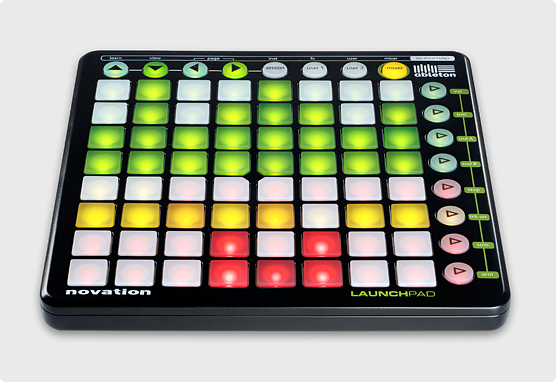
This is an extremely powerful feature that can be combined with new MIDI support to use any number of external controllers like the Novation Launchpad to fire macros.launchpad-ableton-main-image.png
Macros can also be assigned to 'Hot Spots' on screen so that on-air talent can actually trigger macros just by touching a spot in the air. This was a feature originally seen on the TriCaster 8000. So now the TD doesn't have the excuse of only having two hands!

Audio

The TC410 has two mic/line XLRs and two 1/4" audio inputs. The mixer panel has channels for the inputs switchable between those analog connectors or embedded SDI audio. It also has controls for the media players and network inputs. You also get sliders for the main output, streaming output, recording level and the aux output. And all these ins and outs have multi-band EQ and compressors/limiters.


So where exactly does the TC410 fit into NewTek's product line?

Compared to the TC40 you gain:
  • SDI inputs (but no analog) - Use pro cameras.
  • IsoCorder - Record four streams of video. New Feature!
  • 4 balanced audio mic/line audio inputs vs 1 unbalanced stereo and one mic input
  • 2 pair balanced audio outs vs. 1 unbalanced
  • Flexible and route-able M/Es vs VIs - Do a second switch to a second output and more.
  • Macros/Snapshots - One button simplicity.
  • Hotspots - Let the talent trigger macros.
  • MIDI - Trigger macros from 3rd party controllers.
  • Routable Audio - Makes it easier to do quad, SAP or a mix-minus.
  • Adjustable audio delay - Compensate for upstream and downstream equipment latency.
  • Multi-band EQ and Audio Compressors
  • 2nd DDR - Manage your B-roll and commercials.
  • Rugged Rackmount Chassis - Stands up to the rigors of the road.
  • Bigger/Better Controller - Controls for almost every feature of the TriCaster.
  • Social Media Support - Professional quality second screen content.
  • Improved UI/Workflow - Get a handle on even the most complicated production
  • Integrated PTZ Camera Control - Use the joystick on the CS to control your cameras.
  • Improved Network Video Support - Use webcams as an input and send mpeg2 streams to other TriCasters and third party apps.

You lose these features from the TC460:
  • Analog Video I/O - In addition to SDI video inputs and outputs the 460 has component, composite and S-Video ports.
  • Removable Storage - The 460 has a removable drive bay which makes it easy to swap dives.
  • Audio inputs - The 410 has two stereo audio inputs while the 460 has four.
  • Genlock Input - The 410 lacks a genlock input. Most users won't care too much about this.
  • Anim Buffers - Both machines have still buffers (the 460 has 10 while the 410 has 15) but the 460 also has five animation buffers so you can play looping animations without using a DDR.
The Bottom Line:
All in all if you don't need analog video inputs you should take a close look at the 410. If your budget can support the 460 it is a more flexible machine and is worth the difference in price.

NewTek's CTO Andrew Cross on Home Theater Geeks discussing the problems of 4K.